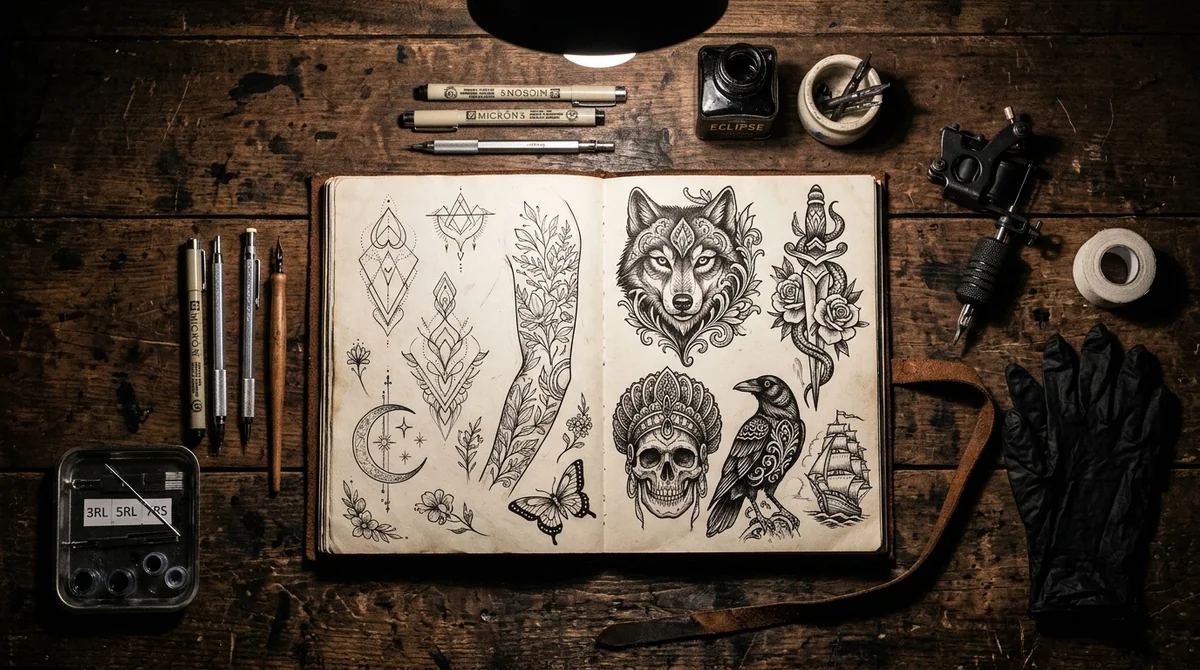
An AI tattoo generator turns text prompts into clean, printable tattoo stencils and flash art before you commit to real ink. No more sketching on napkins. Modern AI engines (like Midjourney v7 / FLUX 3, ChatGPT ChatGPT, and FLUX) let you preview intricate micro-realism, fine-line botanicals, or bold neo-traditional sleeves directly on your screen.
Visualize Tattoos on Skin or Generate Flash Stencils
Test tattoo placements realistically mapped to body contours using AI chatbots, or generate printable flash stencils ready for your artist.

Caricature Maker: Toon Me Art
Turn portraits into artistic cartoon and body art stencils with 1 tap on iPhone.

How to Generate Custom Tattoo Stencils with AI (4-Step Workflow)
Designing a tattoo with AI isn’t like generating standard digital art. Real tattoos have physical constraints: needle thickness, skin elasticity, and anatomical curvature. Here’s how to craft prompts that produce usable stencils your artist will actually appreciate:
- Define Your Core Subject and Emotional Theme: Start with the central motif, such as a mythical creature, a botanical flower, a sacred geometry mandala, or an animal portrait. Add symbolic elements that carry personal meaning.
- Specify the Tattoo Linework & Style: Generic prompts like “cool lion tattoo” produce generic clip-art. Instead, specify the exact artistic genre: fine-line single needle, neo-traditional bold linework, dotwork stippling, or Japanese irezumi.
- Design for Body Placement: Anatomical placement dictates composition. A forearm piece requires vertical flow with tapered margins, whereas a chest piece demands symmetrical horizontal balance. Specifying the target placement in your prompt instructs the model to arrange the design proportionally.
- Isolate on a Pure White Background: Always include negative prompts or directives like
isolated on clean white background, tattoo flash sheet, vector stencil lines. This prevents the AI from rendering mock 3D human skin, lighting shadows, or cluttered room backgrounds that obscure the lines your artist needs.
The 7 Best AI Tattoo Generators in 2026 (Reviewed)
Whether you want a quick flash sketch or a full custom sleeve composition, these top-performing AI tools deliver the highest quality linework, contrast, and style flexibility:
1. Midjourney v7 / FLUX 3 (Best for Ultra-Detailed Realism & Dark Art)
Midjourney v7 / FLUX 3 remains the undisputed gold standard for complex tattoo designs, specifically Black & Grey micro-realism, dark surrealism, and intricate biomechanical art. By appending clear descriptors like vertical flash framing and tattoo flash sheet, high contrast black ink, clean stencil art, Midjourney yields gallery-grade linework that captures subtle skin shading gradients.
2. ChatGPT Plus / ChatGPT (Best for Natural Language Prompting)
If you don’t want to fiddle with Discord commands or technical parameters, ChatGPT Plus with ChatGPT allows you to describe your tattoo in conversational English. You can say: “Design a minimalist fine-line mountain range with a crescent moon above it, formatted as a tattoo stencil with solid black outlines on a pure white background.” You can then iteratively chat to tweak details, add stars, or adjust line weights.
3. FLUX 3 & Stable Diffusion (Best for Exact Linework & Local Control)
FLUX 3 and Stable Diffusion (SDXL) are open-source powerhouses ideal for creators who want zero content filtering and razor-sharp edge definition. Using specialized LoRAs (Low-Rank Adaptations) dedicated to tattoo flash art, these models excel at producing crisp vector-like linework without unwanted shading, making stencil conversion effortless.
4. BlackInk AI (Dedicated Tattoo Design Suite)
Unlike general-purpose image generators, BlackInk AI is built exclusively for body art. It provides preset categories for Dotwork, Blackwork, Flash, Japanese, and Geometric designs, allowing users to select needle styles and generate stencil-ready flash sheets in seconds.
5. TattoosAI (Personalized Style Customization)
TattoosAI is a browser-based generator tailored for people looking for their first tattoo. It guides users through an intuitive 3-step questionnaire covering idea description, visual style, and color preferences, generating multiple variations suitable for consultation mockups.
6. Phot.ai Tattoo Generator (Quick Presets & Ideation)
Phot.ai features an integrated tattoo studio module that provides pre-engineered prompt modifiers for sleeve concepts, wrist flash, and back pieces. It is particularly effective for users exploring initial concept sketches on mobile browsers.
7. Fotor AI Tattoo Maker (Best for Photo Mockups on Skin)
Fotor allows users to not only generate custom tattoo flash from text prompts, but also overlay the generated art directly onto an uploaded photo of their arm, leg, or torso to preview how the piece aligns with their natural skin tone and muscle contour.
Popular Tattoo Styles & Tested Prompt Formulas
Copy and adapt these proven prompt formulas directly into your favorite AI generator for high-precision results:
| Tattoo Style | Defining Aesthetic | Tested Prompt Formula |
|---|---|---|
| Fine-Line Minimalist | Single-needle delicacy, negative space, subtle geometry | Tattoo stencil of a blooming wild rose with celestial stars, fine-line single needle art, ultra-delicate clean linework, minimalist aesthetic, solid white background, high contrast black ink, vector flash |
| Black & Grey Realism | Smooth tonal gradients, depth, volumetric lighting | Tattoo design of an ancient Greek stoic statue bust intertwined with ivy, black and grey micro-realism, smooth charcoal shading, intricate details, stencil linework outline, pure white background |
| Traditional Old School | Heavy black contours, vintage nautical motifs, bold saturation | Vintage American traditional tattoo flash of a roaring panther climbing a dagger, bold black outline weights, classic sailor jerry flash aesthetic, clean negative background |
| Japanese Irezumi | Swirling wind bars, dynamic waves, legendary folklore | Japanese irezumi tattoo design of a fierce Ryu dragon clutching a pearl amidst storm clouds, traditional ukiyo-e style, bold black linework stencil, white background, vertical composition |
| Geometric Dotwork | Sacred geometry, mandalas, stippling gradients | Sacred geometry tattoo stencil of an intricate mandala with metatron's cube, precision dotwork stippling, symmetrical linework, high contrast vector lines, isolated white background |
Pairing Tattoo Art with Text: Script & Font Stencils
While AI image generators excel at complex visual illustrations, they frequently scramble text lettering, roman numerals, and family names. For flawless typography on your tattoos, pair your AI illustrations with specialized script and lettering tools:
- Cursive & Calligraphy Scripts: For delicate quotes, names, and flowing mantras, generate stencil-ready vector outlines using our Cursive Tattoo Font Generator & Printable Stencil Maker.
- Gothic & Chicano Lettering: For bold chest pieces, collarbones, and traditional knuckles, use our Old English Font Tattoo Generator to customize Blackletter and medieval typography.
- AI Image Synthesis: Explore text-to-image prompts across multiple artistic disciplines using our FLUX AI Image Generator Guide.
Turning AI Concepts into Real Ink: What Your Tattoo Artist Needs
An AI image generator produces a conceptual roadmap, not a finished medical-grade stencil ready for a thermal printer. Here is how to work constructively with your tattoo artist using AI references:
- Bring High-Contrast Stencils, Not Hyper-Realistic 3D Renders: Tattoo artists transfer ink via thermal stencil paper (spirit paper). Heavy artificial shading makes line tracing nearly impossible. Always ask the AI for a “clean line stencil.”
- Respect Anatomical Flow: The human body is a 3-dimensional canvas with muscle curvature and joints. A design that looks flat on your phone screen must bend and stretch with your skin. Allow your artist to resize, re-angle, and warp elements to match your musculature.
- Let the Artist Add Their Human Touch: Professional tattoo artists understand needle depths, ink aging, and how fine lines blur (blowouts) over 5 to 10 years. Trust your artist to thicken delicate lines or open up tight clusters so your tattoo looks sharp for decades.
Frequently Asked Questions About AI Tattoo Design
Can AI design a real, printable tattoo stencil?
Yes. By specifying phrases like clean vector stencil, black line art, isolated on pure white background, modern AI generators output high-contrast outlines that tattoo artists can print onto thermal carbon paper or trace directly onto stencil transfer sheets.
What is the best free AI tattoo generator?
For free designs, ChatGPT (Free tier), Bing Image Creator / Microsoft Copilot (powered by ChatGPT), and TattoosAI’s free trial provide high-quality stencil outputs without requiring credit card subscriptions.
Will professional tattoo artists tattoo an AI-generated design?
Most tattoo artists welcome AI-generated designs as visual reference material because it clarifies your vision far better than vague descriptions. However, ethical and experienced artists will always re-draw the piece by hand to ensure lines won’t bleed over time and the composition flows naturally across your muscle anatomy.
How do I prevent AI from adding messy backgrounds to my tattoo?
Always add negative parameters or explicit constraints to your prompt: --no background, photorealistic body, skin, room, 3d shadows. Alternatively, use prompt modifiers like isolated pure white background, flash sheet template to ensure a clean, isolated subject.